
Identify, prioritize, and reduce the risks that matter most to your business.
SecurEnds Risk Management helps organizations understand where their information systems and operations are exposed, then address those risks with realistic, achievable controls. Assess risk across the business, pinpoint control gaps, and track remediation to closure, protecting customer data, privacy, and your reputation while meeting regulatory and audit requirements.
Most organizations still manage risk in spreadsheets, maintaining separate control questionnaires for each regulation by hand. SecurEnds replaces that manual effort with a single cloud platform that turns control assessments into an enterprise risk posture score, a live risk register, and tracked remediation, so you always know your current exposure and what is being done about it.
A risk register that stays current
Every risk has an owner, inherent and residual ratings, a treatment decision, linked controls, and a due date.
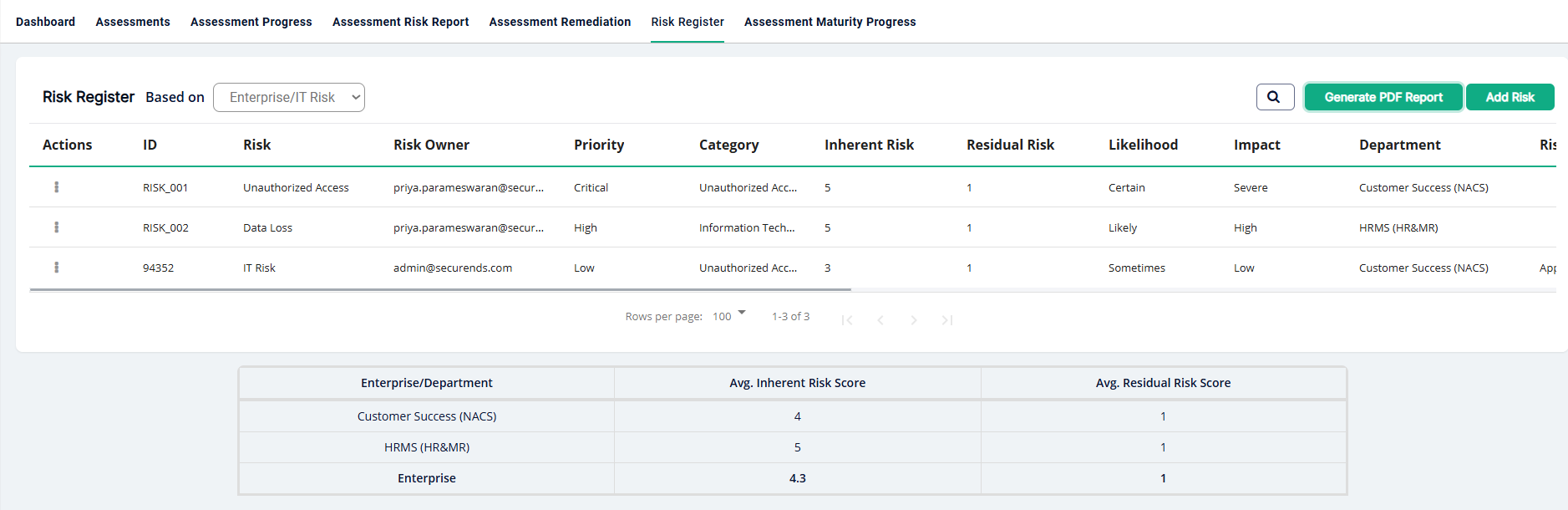
Enterprise / IT risk register
Owners, priority, inherent and residual ratings, likelihood, impact, and department in one live view.
Every assessment finding, traced to a risk you can act on
SecurEnds turns control gaps from your assessments into a structured risk register. Each risk is linked to the exact question that raised it, scored for business impact, and assigned to an owner with a response and a remediation date.
Most risk registers are written from memory in a workshop, disconnected from the assessments that should inform them. SecurEnds builds the register directly from assessment results. When a control is answered as a gap in an internal or vendor assessment, it becomes a risk entry that keeps its full context: which assessment raised it, which control failed, which framework it maps to, and what it means for the business. Auditors can trace any risk back to its source in one click.
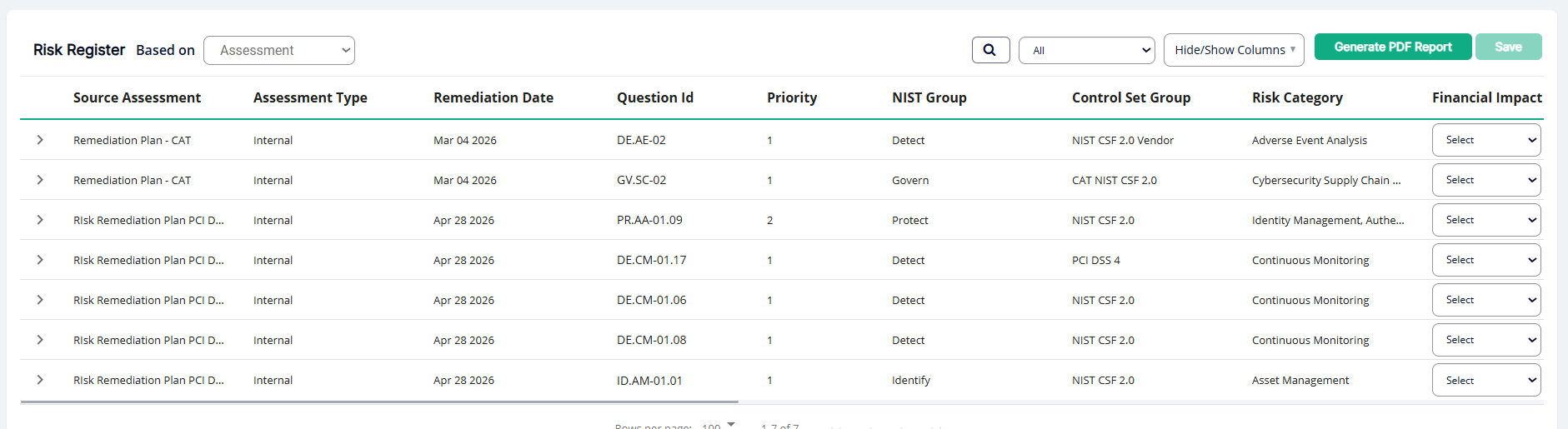
Assessment-based register
Source assessment, question ID, NIST group, control set, and business impact ratings stay with every risk.
How it works
Run the assessment
Assess internal teams or vendors against NIST CSF 2.0, PCI DSS 4.0, or other control sets included in the platform.
Surface the gaps
Control gaps flow into the register automatically, tagged with their question ID, NIST function, and control set.
Score the risk
Rate financial, reputation, and mission impact alongside likelihood to produce an exposure rating.
Decide the response
Choose to mitigate, transfer, accept, or avoid, and assign a risk owner and remediation date.
Report and track
Filter the register, choose the columns you need, and generate a PDF report for auditors and leadership.
What every risk record captures
Traceability to the source
- Source assessment: the assessment or remediation plan that raised the risk.
- Assessment type: internal or vendor, so first-party and third-party risk can be reviewed together or separately.
- Question ID: the exact control reference, such as DE.CM-01 or GV.SC-02, so every risk points back to a specific requirement.
Control and framework context
- NIST group: the NIST CSF 2.0 function the control belongs to: Govern, Identify, Protect, Detect, Respond, or Recover.
- Control set group: the framework the question comes from, such as NIST CSF 2.0 or PCI DSS 4.0.
- Risk category: the control area affected, such as continuous monitoring, asset management, supply chain risk, or identity management.
Business impact
- Financial impact: the potential cost to the organization.
- Reputation impact: the effect on customer and stakeholder trust.
- Mission impact: the effect on the organization's ability to deliver its core services.
Exposure and decision
- Assessment likelihood: how likely the risk is to occur, based on assessment results.
- Exposure rating: a single rating that brings impact and likelihood together, so the highest risks rise to the top.
- Priority: the order in which risks should be addressed.
- Risk response: the treatment decision (mitigate, transfer, accept, or avoid).
Accountability
- Risk owner: the person accountable for the decision and the outcome.
- Remediation date: when the fix is due.
- Status: where the risk stands today, from open through to closed.
Built for how risk teams actually work
Two views, one register
Switch between an assessment-based view and an enterprise or IT risk view, depending on whether you're working from findings or from strategic risks.
See only what you need
Show or hide columns to build a view for security teams, risk committees, or auditors.
Drill into any risk
Expand a row to see the full detail behind it without leaving the register.
Filter fast
Narrow the register by status, priority, framework, or function.
Audit-ready in one click
Generate a PDF report of the register for examiners, auditors, and board packs.
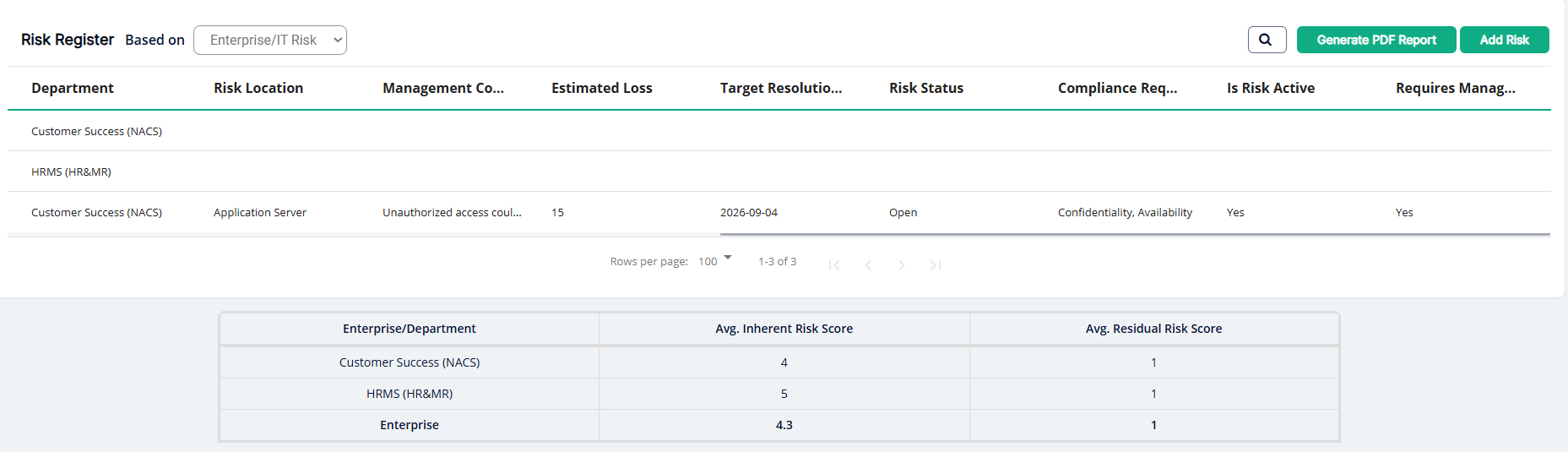
Configurable columns
Show the fields each audience needs—from risk location and estimated loss to compliance requirements and status.
From control gap to business decision, in one record
SecurEnds converts assessment findings into risks scored the way executives think: what it costs, what it does to your name, whether it stops the mission, and how likely it is to happen.
The problem with a technical risk register
A finding that reads "DE.CM-01.17 not met" tells a security engineer plenty and a board member nothing. That's why remediation budgets stall. The gap is real, but nobody has translated it into business terms.
SecurEnds keeps the full technical trail (source assessment, question ID, NIST function, control set) and adds four business ratings on top. The same record then works for the engineer fixing it and the executive funding it.
How a risk is created
Gap appears
A control gap appears in an internal or vendor assessment.
Enter register
The finding enters the register carrying its source assessment, assessment type, question ID, NIST group, control set group, and risk category.
Rate impact
The risk owner rates the impact across financial, reputation, and mission, and confirms assessment likelihood.
Score exposure
SecurEnds calculates an exposure rating and sets priority.
Assign response
A risk response is chosen, an owner assigned, and a remediation date set.
Track to close
Progress is tracked through status until evidence of closure is attached.
What this gives each team
Security
Security teams keep full traceability to the control and question that raised each risk.
Risk
Risk teams get consistent, comparable scoring across internal and vendor findings.
Compliance
Compliance teams can show examiners how risks were rated and treated.
Executives and boards
Executives and boards see risk in the language they use for every other decision.
Finance
Finance gets a defensible basis for remediation spending.
Risk Register FAQs
Why rate three impact types instead of one?
A single score hides the reason a risk matters. Separating financial, reputation, and mission impact shows whether a risk threatens your budget, your name, or your ability to operate, and those have different owners and different fixes.
Who sets the impact ratings?
The risk owner, usually the business owner of the affected process, with input from the security team that raised the finding. That keeps accountability with the people who can act on it.
How is assessment likelihood different from a generic likelihood estimate?
It is based on what the assessment found: control strength, compensating controls, and exposure, rather than an opinion formed in a workshop.
Can we use our own rating scales?
The rating options are configurable to match your risk methodology and appetite statements.
One export. Every gap, every owner, every next step.
The SecurEnds Risk Remediation Report turns a completed assessment into an audit-ready document: a posture summary up front, a function-by-function breakdown, and every control question with its status and remediation plan.
See your risks in one live register
Assess risk across the business, pinpoint control gaps, and track remediation to closure.